Client Onboarding: A First-Week Checklist for Consultants
Client onboarding for consultants: confirm scope, name the first deliverable, test access, and leave kickoff with owners and dates for every open item.
By The Professional Business Bundle by Cosmo Suite · Editorial policy
Published · 8 min read
Client onboarding is the work between a client's yes and the first useful deliverable. For a solo consultant, it does not need to become a separate project. It needs a clear scope, one named client contact, the information and access required to start, and a date for the first review.
The first week is working when both sides can answer three questions: What happens first? Who owes the next action? When will you check whether the plan still fits? A short record can hold those answers without making your client learn another system.
Client onboarding at a Glance
| Stage | Record this | Ready to move on when |
|---|---|---|
| Confirm the engagement | Scope, exclusions, fee process, first result | Both sides can describe the same first deliverable |
| Welcome the client | Main contact, working channel, first date | The client knows what you need and what happens next |
| Prepare kickoff | Questions, decisions, client inputs | The right people and materials are available |
| Start the work | Access tested, open items assigned | You can complete the first task without guessing |
| Review the week | What moved, what is waiting, next date | Both sides agree on the next action and any changed timing |
Start by identifying which missing answer would change the first deliverable, its timing, or who needs to approve it. Then request the minimum details needed to settle those questions.
Use a three-part start test for each open item: does it affect the first deliverable, who owns the answer, and what date keeps the plan on track? If it does not affect the first deliverable, it may not belong in the initial request. This keeps onboarding short without leaving a real dependency hidden.
What should you settle before sending a welcome email?
Confirm the work in writing before you set the first delivery date. The written record should make the work, limits, fee arrangement, and next step clear enough that neither person has to reconstruct the deal from a sales call.
For an independent consultant, the starting record can be simple. Include the outcome the client wants, what you will deliver, what is outside the work, the fee and payment process, the first milestone, and who can approve a change. If the client uses a purchase order or has a required invoice route, find that out before the first invoice is due.
RICS guidance on initial client agreements says the client and firm should be clear on the nature and scope of service, its limits, fees, and timescales. That guidance applies to its professional context, but the basic practice is useful more widely: write down what was agreed and make changes visible. This is process guidance, not legal advice.
Do not collect every fact that might someday be useful. Ask for the assets, decisions, account access, or background that the first deliverable needs. Keep credentials out of a general notes file; ask the client to use a secure sharing method they already trust.
If the scope itself is still vague, settle it with the client before kickoff. A kickoff cannot resolve a basic disagreement about what the client hired you to do. For the separate question of managing several engagements after they start, see this three-file setup for project management for freelancers.
What belongs in a first-week client onboarding checklist?
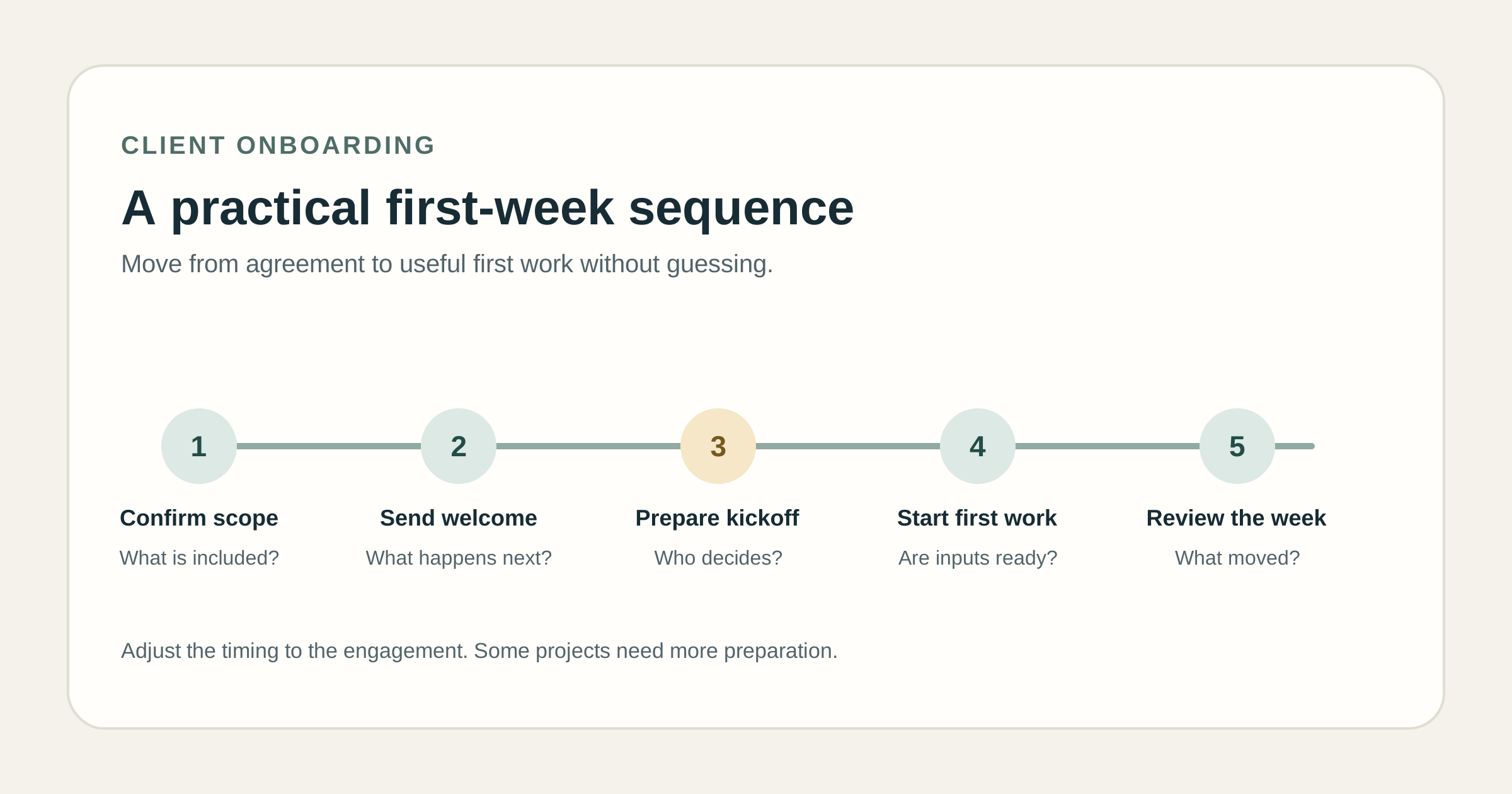
Treat the checklist as a sequence of decisions, not a list of tools to install. The exact order depends on the project, but most small engagements need a welcome, a kickoff, the required inputs, a first piece of work, and a review point.
At the start: Send a short welcome that names the first deliverable, the next meeting or check-in, and the one or two items you need first. Give each request an owner and a requested date. Avoid sending a long questionnaire before you know which answers matter.
Before kickoff: Read the signed scope and the notes from the sales conversation. Mark what is already settled and what still needs a decision. Ask the client to invite the person who approves the work, if that person is different from your day-to-day contact.
At kickoff: Agree on the first result, what “ready for review” means, the client inputs it depends on, and where feedback will arrive. Put the next check-in on the calendar before the call ends. For a short agenda and decision prompts, see the project kickoff meeting guide.
After kickoff: Send a recap with decisions, owners, dates, and unresolved questions. Test any essential access by doing the task you need to do, not just by confirming that an invitation arrived. Then begin the first deliverable or tell the client what is blocking it.
At the end of the week: Compare the plan with what actually happened. Mark completed items, carry forward open requests, and tell the client if a dependency changes the next date. This is a useful review rhythm, not a promise that every project can be fully onboarded in five business days.
Agility PR Solutions' April 2025 checklist describes agency onboarding steps such as setting expectations, collecting information and assets, and establishing communication. It is written for agencies, so adapt the steps to the scale of your engagement. A March 2024 Belkins account-management article on client onboarding focuses on the handoff through kickoff in that company's context. Those are examples of process design, not evidence that one sequence works for every consultant.
How do you make the kickoff useful for a small engagement?
A useful kickoff closes gaps that would otherwise delay the first deliverable. It does not need a presentation. It needs the client and consultant to agree on the work, the approval path, and the next action.
Use a short agenda:
- Restate the outcome and the first deliverable.
- Confirm what the client will provide and by when.
- Identify the person who approves the work and how feedback will be sent.
- Check any access or materials needed to start.
- Record risks, unanswered questions, and their owners.
- Set the next review date.
Keep the meeting notes brief. Record a decision in the form “decision, owner, date” and give each open question a next step. Do not treat silence in a meeting as approval. Ask the person with authority to confirm decisions that affect scope, timing, or cost.
What should you track after kickoff?
Use one kickoff record with a handful of fields that you can scan before replying to the client. A useful record connects the agreement to the first work instead of duplicating every email or storing a full project history.
| Field | Example entry |
|---|---|
| First deliverable | Draft landing-page copy |
| Client input | Current product notes, owned by client contact |
| Approver | Marketing lead |
| Access check | Shared folder opens; source brief still needed |
| Next decision | Confirm draft direction at review |
| Next check-in | Friday, agreed with the client |
This is an illustrative example, not a client case study. Change the fields to match your work. For a design engagement, access might mean a brand folder; for a consultant, it might be a dataset or stakeholder interview. Do not put passwords or sensitive client records into a general project tracker.
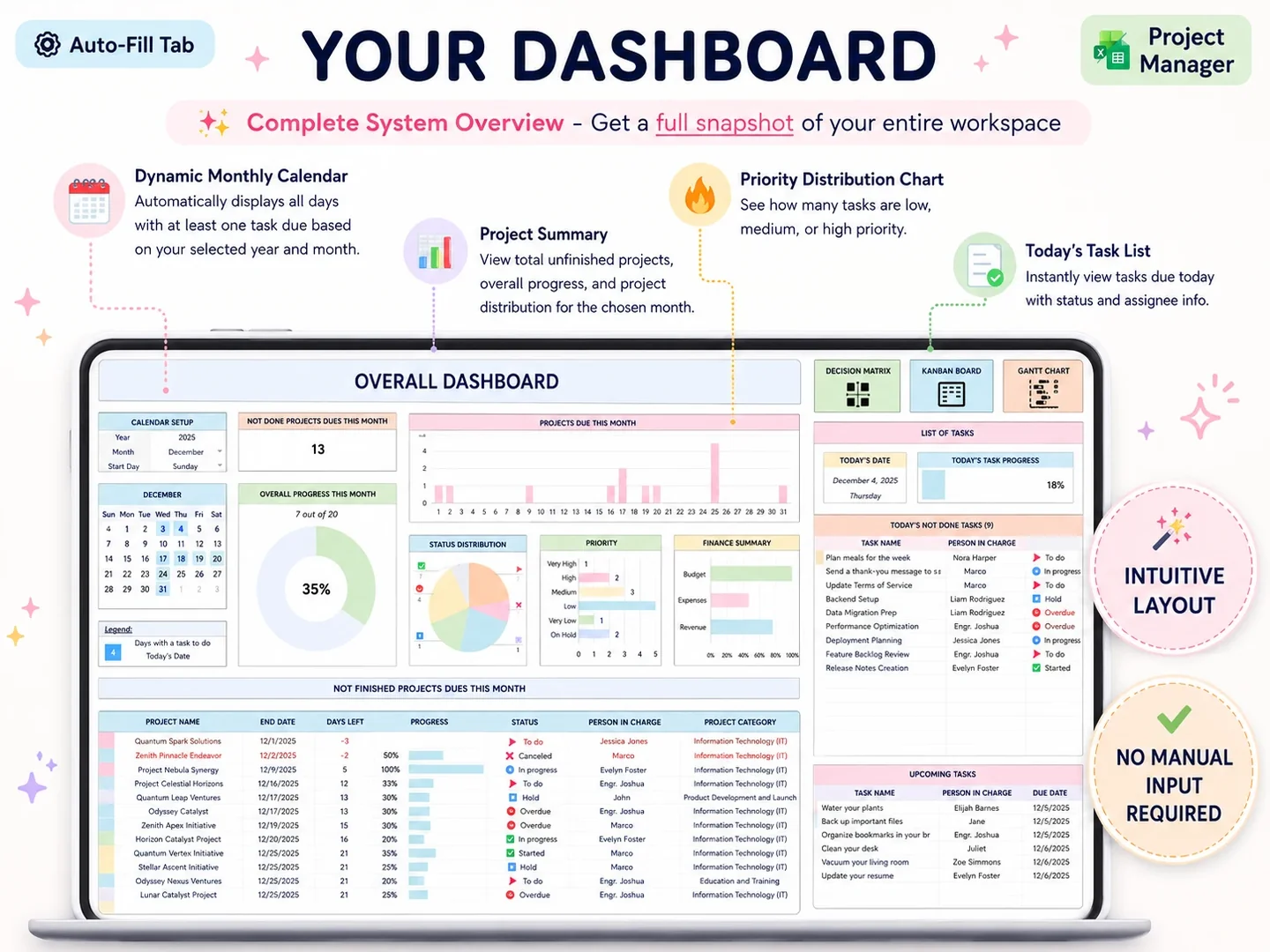
If you manage several client projects, a project overview can help you see which work is active and what is overdue. The project manager template checklist explains the views to look for. A dashboard is useful for project status; it does not replace the kickoff record or client conversation.
What if a client has not sent an input or access?
Name the missing dependency, who owns it, what it blocks, and when you need an answer to keep the current date. Then state the effect on the plan in plain language. A task-specific request gives the client something to answer; “waiting on you” does not say what is missing.
For example: “I have the outline ready. I still need the product screenshots from you before I can prepare the annotated draft. If they arrive by Wednesday, I can keep Friday's review. If they arrive later, I will send a revised review date.” This is an illustrative message. Use the real task and dates from your engagement.
If the missing item changes the agreed work, pause and discuss the change before proceeding. The written scope should make the deliverable and limits visible; a change request should say what moves, what it costs if relevant, and who needs to agree. Do not assume the client has approved a change because they sent new material.
When is a spreadsheet enough for onboarding?
A spreadsheet or short document can work when one person owns the record, the client receives updates directly, and the process has few dependencies. Keep the client record focused on decisions and next actions. If it becomes a second copy of a task system, choose one source of truth and link to it.
Use a dedicated project or client platform when several people need to update the same work, the client needs a login or portal, or reminders and integrations are part of the service. A spreadsheet does not provide those features by itself. The right choice depends on how the engagement runs, not on how many onboarding fields you can add.
For a solo consultant who wants to keep multiple projects and the work week in files, the Professional Business Bundle includes a Project Manager with 15 tabs, a Professional Planner for OneNote with 215+ pages, Weekly Planner Pro with 8 tabs, and a budget spreadsheet with 28 tabs. The spreadsheets are for Excel 365 and Google Sheets; the planner is for OneNote. The files do not provide client portals, live collaboration, or notifications.
Why trust this article
The Professional Business Bundle is a set of downloadable planning files, so its publisher has a commercial interest in spreadsheets. This article describes a general process and names where dedicated software may fit better. The sources include RICS guidance and two dated agency examples, checked on 24 October 2026. Read the about page and editorial policy for publisher details.
Where the Professional Business Bundle fits
Client onboarding is a sequence of conversations, agreements, and client-owned inputs. A template can help keep project dates and tasks visible after those details are agreed, but it cannot collect client materials or replace an approval process.
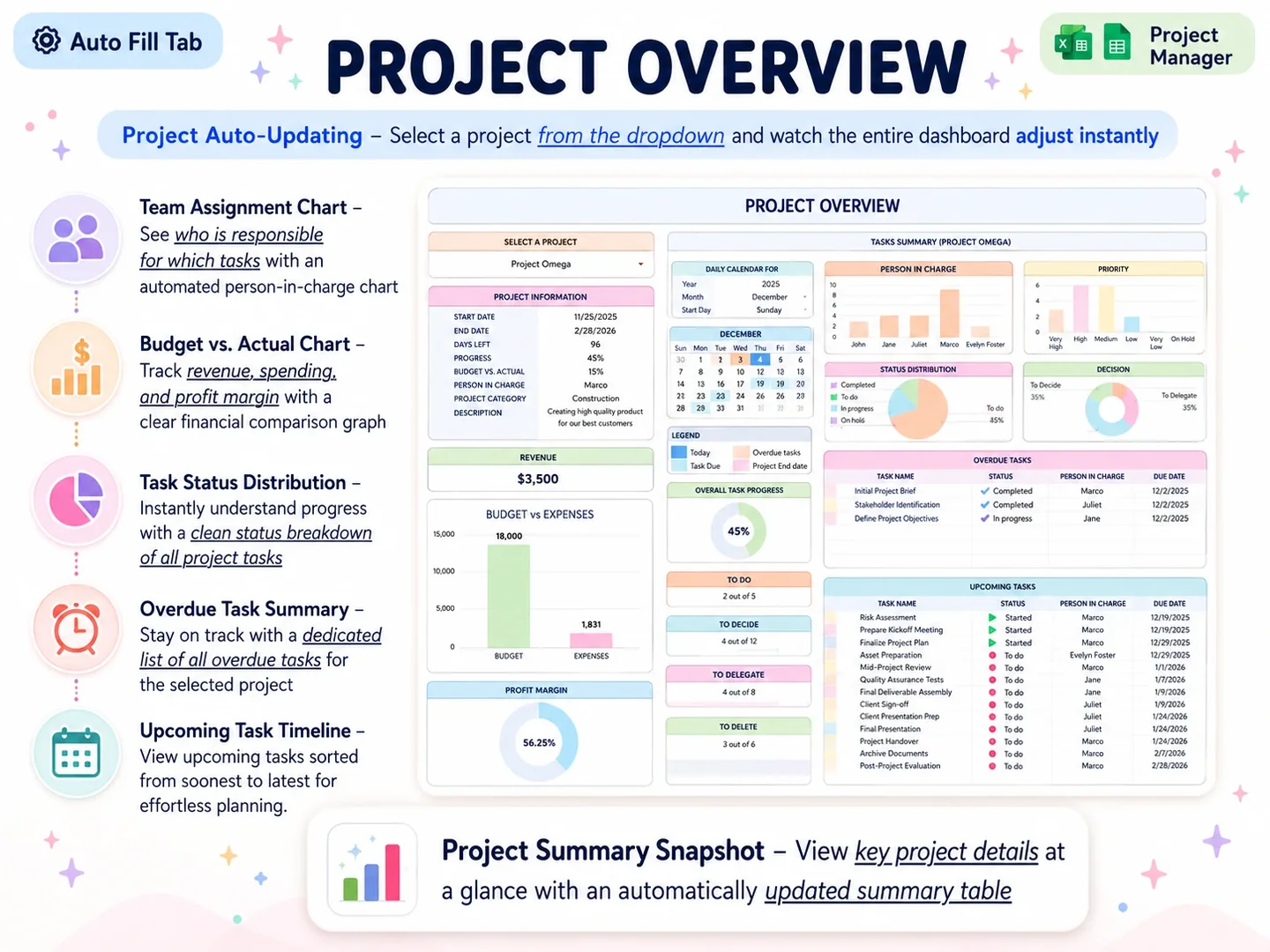
The Professional Business Bundle includes Excel and Google Sheets project files, a OneNote planner, and a step-by-step YouTube tutorial. Its Project Manager has a project overview and task schedule. If you already use files to plan delivery, see the Professional Business Bundle for the included formats and contents. The listed price is a one-time $9; decide based on whether the files match your current workflow.
Frequently asked questions
What is the best client onboarding process?
Start with the agreed scope and first deliverable. Name the client contact and approver, collect the inputs needed for that deliverable, test essential access, record open questions with owners and dates, then review the plan at the end of the first week.
What should be included in client onboarding?
Include the agreed work and exclusions, first deliverable and date, client inputs, access needed, decision maker, approval route, billing contact or process, communication method, open dependencies, and the next check-in. Ask only for information needed for the engagement.
What are the five Cs of effective onboarding?
There is no single standard five-C model for consultant onboarding. Some articles use their own framework. For a small engagement, focus on clear scope, contacts, client inputs, access, and checkpoints instead of treating an acronym as a rule.
How long should client onboarding take?
It depends on the work and the client's response time. A small engagement may be ready to start after a short kickoff and a few required inputs. A larger project may need a longer discovery and access stage. Set the first milestone and review date with the client.
How do you onboard a consulting client?
Confirm the written agreement and intended result, send a concise welcome note, collect required inputs, hold a kickoff, test access, and document owners, decisions, and dates. Start the first deliverable only when its necessary dependencies are available.
When should a consultant use onboarding software?
Use dedicated software when clients need a portal, several people must update the same process, or automated reminders and integrations matter. A short document or spreadsheet can be enough when one person owns the record and sends updates directly.